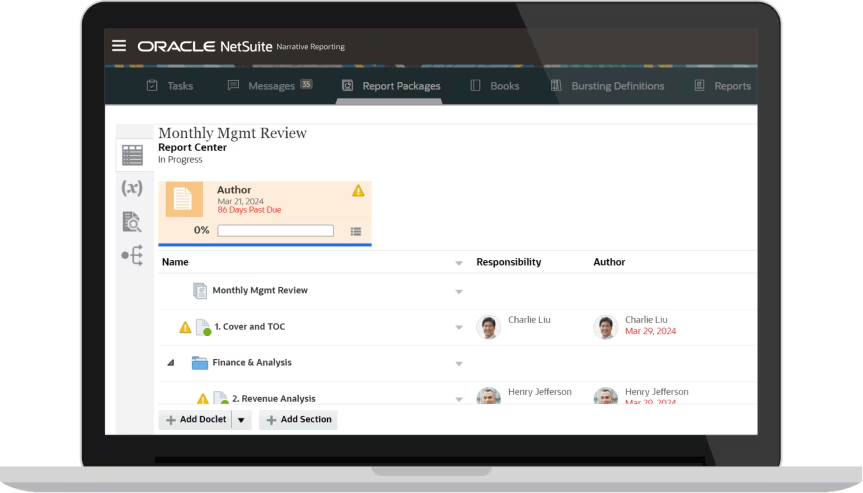

Most finance teams produce the same report many times over. The board pack, the investor update, the monthly management report: each one gets rebuilt from exports, reformatted in Word or PowerPoint and circulated by email for commentary. The numbers change every cycle and the process rarely does. By the time the final version reaches the board, the underlying data may already be out of date and nobody can say with certainty which version is the final one.
TL;DR
- NetSuite Narrative Reporting is now available to Australian customers as part of the NetSuite EPM suite
- It combines financial statements, charts and written commentary in a single governed report package
- Authors work in Word, PowerPoint and Excel through Smart View, with data points that refresh from live NetSuite Planning and Budgeting data
- Built-in review, sign-off and audit trails replace the email chains behind most board and investor packs
- AI-assisted narrative generation drafts explanations and visuals directly from financial data
NetSuite Narrative Reporting, part of the NetSuite Enterprise Performance Management (EPM) suite, has now arrived for Australian customers. It addresses this exact workflow: the recurring, multi-author, high-stakes reports where numbers and written explanation have to sit together and stay current.
This article covers what the NetSuite Narrative Reporting module does, how the report package model works, where AI fits and which organisations stand to gain the most from it.
Narrative Reporting or Narrative Insights?
A naming clarification first, because NetSuite offers two similarly named features. Narrative Insights is a generative AI capability inside the core NetSuite ERP, introduced in the 2026.1 release and available in Australia, which gives individual users on-screen summaries of the report or record in front of them. Narrative Reporting, the subject of this article, is the EPM module for producing governed board packs, presentations and stakeholder reports from your data. The names are close but they solve different problems.
What is NetSuite Narrative Reporting?
Narrative Reporting is an add-on module within NetSuite EPM, built on the Oracle Fusion Cloud EPM platform that powers reporting for some of the largest organisations in the world. Its purpose is to combine financial statements, charts and data with written narrative in a single report, produced through a structured process of defining, authoring, reviewing and publishing. The easiest way to picture it is the board deck or PDF you already produce, with every data point connected to its source, so the pack refreshes itself rather than being repopulated by hand each cycle.
The distinction from standard NetSuite reporting sits in the word narrative. Saved searches and financial reports tell you what the numbers are. Narrative Reporting is designed for the documents that explain why: the commentary on a margin movement, the context behind a variance, the outlook statement that accompanies the quarterly results. In most organisations that explanation lives in email threads and locally saved Word documents, disconnected from the data it describes. Narrative Reporting brings both into one governed environment.
Data is drawn from NetSuite Planning and Budgeting and other NetSuite EPM applications. The module has no direct connector into the core ERP; financial data reaches it through Planning and Budgeting, where actuals, budgets and forecasts already sit. When actuals are updated or forecasts move, the report refreshes rather than being rebuilt. The manual reassembly that typically precedes board reporting becomes a refresh step inside the platform.
Where it sits in the NetSuite EPM suite
NetSuite EPM extends the core ERP with a set of dedicated performance management modules. Narrative Reporting joins the modules already in use by Australian and New Zealand customers, extending the suite from planning and close into stakeholder reporting.
| EPM module | What it does |
|---|---|
| Planning and Budgeting | Company-wide and departmental budgets, forecasts, scenario models and driver-based planning |
| Account Reconciliation | Automated reconciliations and transaction matching to speed up and de-risk the close |
| Profitability and Cost Management – not yet in ANZ | Granular allocation modelling and profitability analysis down to product or business line level |
| Narrative Reporting | Governed, collaborative report packages combining live data with written commentary |
| Tax Reporting – not yet in ANZ | Alignment of corporate tax processes with financial reporting for visibility and compliance |
Because Narrative Reporting and Planning and Budgeting share the same data, the figures in a board pack match the figures in the planning model. There is no version reconciliation between the presentation and the system because there is only one source.
How report packages work
The organising unit in Narrative Reporting is the report package. A report package breaks a large report, such as a board book or an annual report, into individual sections called doclets. Each doclet is assigned to an owner and moves through a defined lifecycle of authoring, review, sign-off and publication.
This structure maps to how these reports actually get written. The CFO commentary comes from one person, the divisional performance sections from others, the outlook from someone else again. Under the email-based approach, coordinating those contributors is a project management exercise handled through inbox archaeology. Under the report package model, each contributor works on their assigned doclet inside a workflow that tracks status and records every change.
| Reporting task | Typical manual approach | With Narrative Reporting |
|---|---|---|
| Data collection | Export from NetSuite, paste into Excel, reformat for the document | Data points embedded in the report refresh directly from Planning and Budgeting and other EPM sources |
| Commentary | Drafted in separate documents, collected by email | Authored in assigned doclets, with AI-generated draft narratives available as a starting point |
| Review and approval | Tracked changes across multiple file versions | Structured review and sign-off phases with a full record of who approved what |
| Version control | Filenames ending in final, final2 and FINAL-v3 | One report package with version locking and commentary history |
| Distribution | PDF attachments emailed to the full list | Secure publication where each stakeholder group sees only the sections they are permitted to see |
Authors keep working in Word, PowerPoint and Excel
Adoption is where reporting tools have historically come unstuck, because finance teams have decades of muscle memory in Microsoft Office and any tool that asks them to abandon it faces an uphill battle. Narrative Reporting takes a different route through Oracle Smart View, an extension that connects Word, PowerPoint and Excel directly to the report package.
Authors write their doclets in Word or build their slides in PowerPoint exactly as they do today. The difference is under the surface: figures referenced in the narrative are live data points, not typed numbers. When the data changes, a single refresh updates every embedded figure across the document. A board book that stays largely the same in structure each quarter can be refreshed minutes before the meeting, with the narrative updated around numbers that are guaranteed to be current.
In Excel, Smart View supports ad hoc analysis against Narrative Reporting and other EPM data sources, and the results of that analysis can be embedded into report narratives as refreshable content. The analyst who investigates a variance in Excel can drop the finding straight into the commentary without retyping anything.
Where AI fits
Narrative Reporting applies data science and machine learning together with generative AI to help draft the explanations that accompany the numbers. Rather than starting each commentary section from a blank page, authors can generate AI-powered narratives, explanations and visuals directly from the financial and transactional data in the report, then edit and refine from there.
This is drafting assistance operating inside a governed process, which matters for documents that carry regulatory or fiduciary weight. Every AI-generated narrative still passes through the same authoring, review and sign-off workflow as human-written content. The person who signs off remains accountable for what the report says. The AI reduces the time it takes to get to a reviewable draft.
Governance, audit and regulatory reporting
The reports Narrative Reporting is built for tend to be the ones with the highest stakes: board papers, investor communications, statutory and regulatory submissions. The governance model reflects that. Access is role-based, so owners, authors and reviewers each hold only the permissions their task requires. Access can be restricted at the level of individual doclets, protecting sensitive sections such as remuneration detail from contributors working elsewhere in the same document. The full lifecycle of authoring, review, approval and publication is captured in an audit trail, with version locking and commentary history available for external audit.
For organisations with multinational obligations, the module supports Country by Country Reporting, generating the XML-formatted output required by country-specific regulations alongside the narrative formats. Multi-entity groups also benefit from the underlying EPM consolidation support covering currency adjustments, intercompany eliminations and tax alignment.
Who gains the most
The strongest candidates for Narrative Reporting share a common profile: recurring reports where numbers and narrative have to move together, produced by multiple contributors under time pressure.
- Multi-entity groups producing consolidated board and management packs across subsidiaries and currencies
- PE-backed and investor-reporting businesses with demanding monthly or quarterly reporting obligations to external stakeholders
- Organisations with regulatory or statutory reporting requirements where audit trails and sign-off records are examined
- Finance teams already running NetSuite Planning and Budgeting, which supplies the data Narrative Reporting draws on, extending an existing EPM investment into the final reporting mile
For a business producing one short monthly report from a single entity, the case is thinner. The value scales with the number of contributors and the consequences of getting a version wrong.
Getting started in Australia and New Zealand
Narrative Reporting is licensed as an add-on module and configured against your Planning and Budgeting environment and reporting structures. Implementation typically starts by selecting one recurring report, most often the board pack, mapping its sections to doclets and running a full cycle in parallel with the existing process before cutting over.
Annexa works with Australian and New Zealand finance teams across the full NetSuite EPM suite, from planning and reconciliation through to reporting. If your board pack still starts with an export and ends with an email chain, a scoping conversation on Narrative Reporting is a practical next step.
Get a personalised NetSuite pricing estimate
Receive a tailored NetSuite quote based on your business requirements, users, modules and implementation needs.
Frequently asked questions
What is NetSuite Narrative Reporting?
NetSuite Narrative Reporting is an add-on module within the NetSuite EPM suite that combines financial statements, charts and data with written commentary in a single report. It provides a governed environment where teams define, author, review and publish management and regulatory reports, with data drawn from NetSuite Planning and Budgeting and other EPM sources.
Is NetSuite Narrative Reporting available in Australia?
Yes. Narrative Reporting has recently become available to Australian customers, joining the NetSuite EPM modules already in use across Australia and New Zealand. It is licensed as an add-on module to your NetSuite environment.
Do I need NetSuite Planning and Budgeting to use Narrative Reporting?
Narrative Reporting connects to NetSuite Planning and Budgeting and other EPM data sources rather than to the core NetSuite ERP directly. In practice it is deployed alongside Planning and Budgeting, which acts as the data source for the actuals, budgets and forecasts referenced in report packages.
What is a report package?
A report package is the organising structure in Narrative Reporting. It breaks a large report such as a board book into individual sections called doclets, each assigned to an author and tracked through defined authoring, review, sign-off and publication phases. Access can be controlled at the level of individual doclets.
Do report authors need to learn a new tool?
Authors continue working in Word, PowerPoint and Excel through Oracle Smart View, an Office extension that connects those applications to the report package. Figures embedded in documents become refreshable data points, so a single refresh updates every number in the report from live Planning and Budgeting data.
How is Narrative Reporting different from Narrative Insights?
Narrative Insights, introduced in NetSuite 2026.1, is part of the core NetSuite ERP and is available in Australia. It uses generative AI to produce on-screen summaries of supported reports and records for individual users. Narrative Reporting is a full EPM module for producing governed, multi-author report packages with structured review, sign-off, audit trails and publication controls. They serve different reporting needs.
Does Narrative Reporting use AI?
Yes. Narrative Reporting applies data science and machine learning together with generative AI to draft narratives, explanations and visuals from financial and transactional data. AI-generated content passes through the same review and sign-off workflow as human-written content, so accountability for the final report is unchanged.
Does it support regulatory reporting?
Narrative Reporting supports management and regulatory reports, including Country by Country Reporting with XML-formatted output aligned to country-specific regulations. Role-based permissions, audit trails and version locking support external audit and compliance requirements.