








What Netsuite bank feeds can do for your business
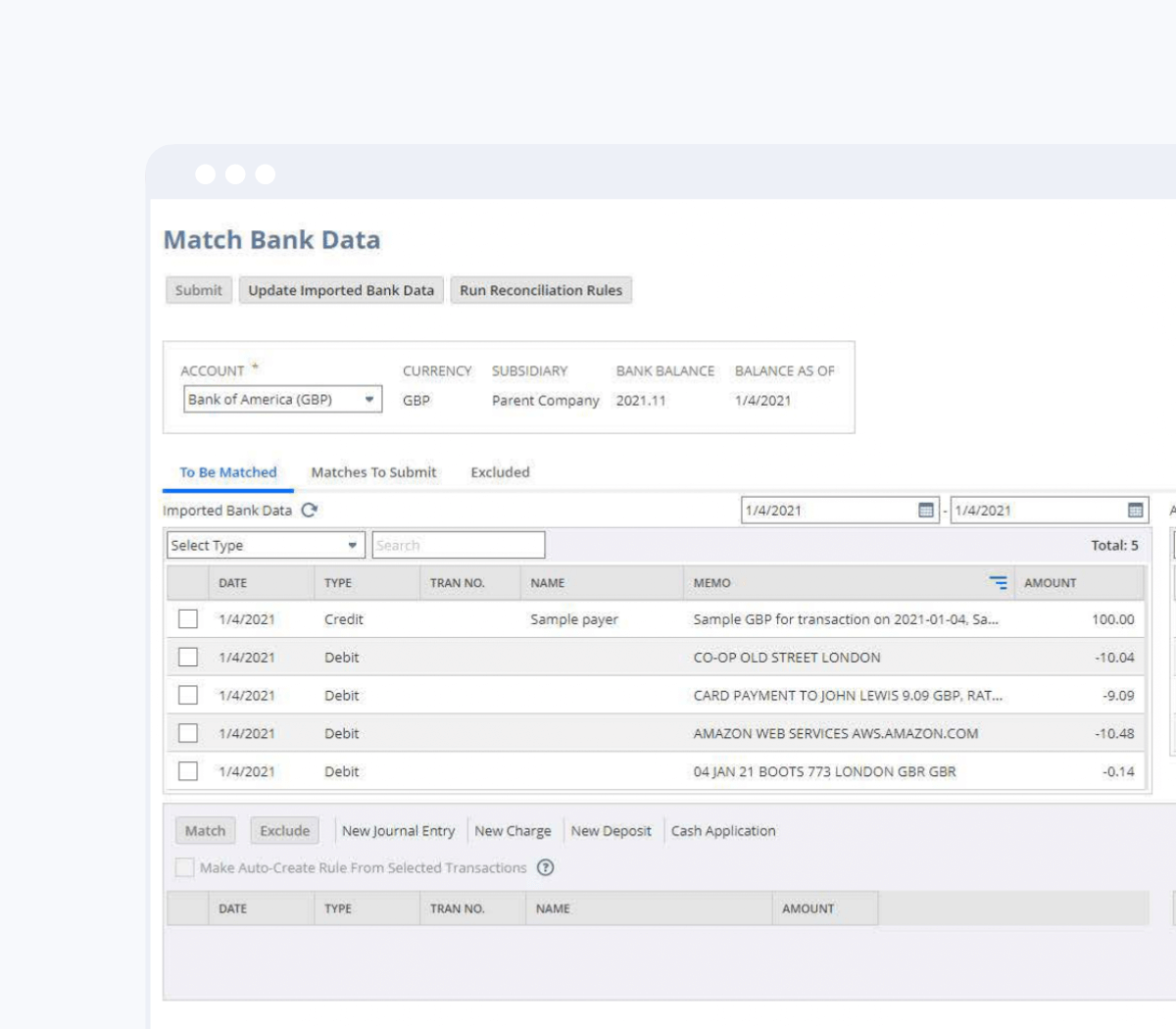
NetSuite Bank Feeds gives you complete visibility and control over your banking transactions by automatically importing and matching bank data directly into your NetSuite accounts in real time. This comprehensive solution eliminates the inefficiencies of manual bank reconciliation by streamlining transaction matching and connecting your banking data directly to your financials within one powerful, cloud-based ERP system.
-
Get a NetSuite pricing estimate
Let Annexa, Australia and New Zealand’s most experienced NetSuite implementation partners, prepare a tailored pricing estimate for your organisation.
Core features of Netsuite bank feeds
Significant time savings
-
Re-route team effort
Accessing data from multiple financial institutions through one platform vastly reduces the amount of data entry and delivers a huge impact on efficiency.
-
Never miss a transaction
With regularly importing bank transactions, you can be confident that you are working with a complete record of all your financial activities.
-
Future-oriented reporting
Get greater visibility and control over your cash flow and improve cash flow forecasting to support business decisions.

Who is NetSuite Bank Feeds for?
NetSuite Bank Feeds delivers value to any Australian or New Zealand business where bank reconciliation is a regular, time-consuming process, but is particularly well-suited to the following.
-
Finance teams with high transaction volumes.
-
Multi-entity businesses managing separate bank accounts for each subsidiary or operating.
-
Businesses with multiple bank accounts across different institutions no longer.
-
Businesses preparing for BAS lodgement.
-
Fast-growing businesses that have outgrown spreadsheet-based or standalone accounting tools.
-
Cash-conscious businesses in retail, hospitality, or trade.






Why choose Annexa?
At Annexa, we combine deep Oracle NetSuite ERP expertise with a practical, people-first approach. We work alongside your team to deliver implementations that are built to last and designed to evolve as your business grows.
- Over a decade as a leading Oracle NetSuite Solution Provider across Australia and New Zealand
- Proven delivery across complex ERP implementations, integrations and multi-entity environments
- A structured implementation methodology shaped by real-world customer outcomes
- One of the most highly certified NetSuite teams in the region, spanning finance, technical and integration specialists
- Ongoing optimisation and advisory services to help customers keep extracting value from NetSuite
Collaboration sits at the centre of how we work. We build long-term partnerships with our customers, acting as an extension of their team to support growth, change and continuous improvement.





Industries we work with
RESOURCES
Customer stories
let’s chat
Progress starts with engaging conversations.
Reach us via the online chat, the form, or give us a call.
- ✓ NetSuite AI & ecosystem experts
- ✓ Leaders in integration
- ✓ Award-winning team
- ✓ Strategic partner network
- ✓ Innovation always
Frequently asked questions
NetSuite Bank Feeds uses a combination of direct bank feed connections and aggregation services to retrieve transactions from supported financial institutions. Major Australian and New Zealand banks including Commonwealth Bank, ANZ, Westpac, and NAB are supported, along with a broad range of other banks and credit card providers. Connection methods vary by institution, and Annexa will confirm supported connections for your specific banking relationships during scoping.
Yes. You can connect as many bank accounts as needed, across different financial institutions and different currencies. Each account is mapped to the appropriate GL account within NetSuite, and all accounts are managed from the same reconciliation interface.
NetSuite is used by businesses of all sizes, from startups to rapidly growing companies. If you are considering making the switch but unsure about the cost, here is a quick breakdown. NetSuite operates on an annual subscription model, which includes three key components: the core platform, optional modules, and the number of users. There is also a one-time implementation fee for the initial setup. As your business expands, you can easily add new modules and users, thanks to the flexibility of cloud software. Bank Feeds functionality is available as part of the NetSuite platform. Want to get a NetSuite pricing estimate? Contact us now to discuss your specific needs.
Yes. Foreign currency bank accounts are fully supported. Transactions are recorded in the account’s local currency and automatically converted to your base currency using the exchange rates configured in NetSuite. This is particularly useful for businesses with USD, EUR, or NZD operating accounts alongside their primary AUD accounts.
This depends on the financial institution and the connection method used. Most bank connections support importing recent transaction history at the point of setup, typically covering the previous 30 to 90 days. Annexa will advise on the available history for your specific banks during the implementation scoping process.
When transactions are imported and coded correctly in near real time, your GST-coded transactions are always current in NetSuite. This means your BAS workpapers are largely complete before the quarter even closes, rather than requiring a concentrated effort to catch up before the lodgement deadline. Accurate, timely coding also reduces the risk of GST errors that can attract ATO scrutiny.
Yes. NetSuite’s matching rules are configurable to suit how your business processes payments and receipts. Common customisations include matching by exact amount, matching within a tolerance, matching by reference number pattern, and auto-reconciling certain transaction types such as payroll or known recurring payments. Annexa configures these rules during implementation based on your transaction patterns and reviews them during the first reconciliation cycles to refine accuracy.