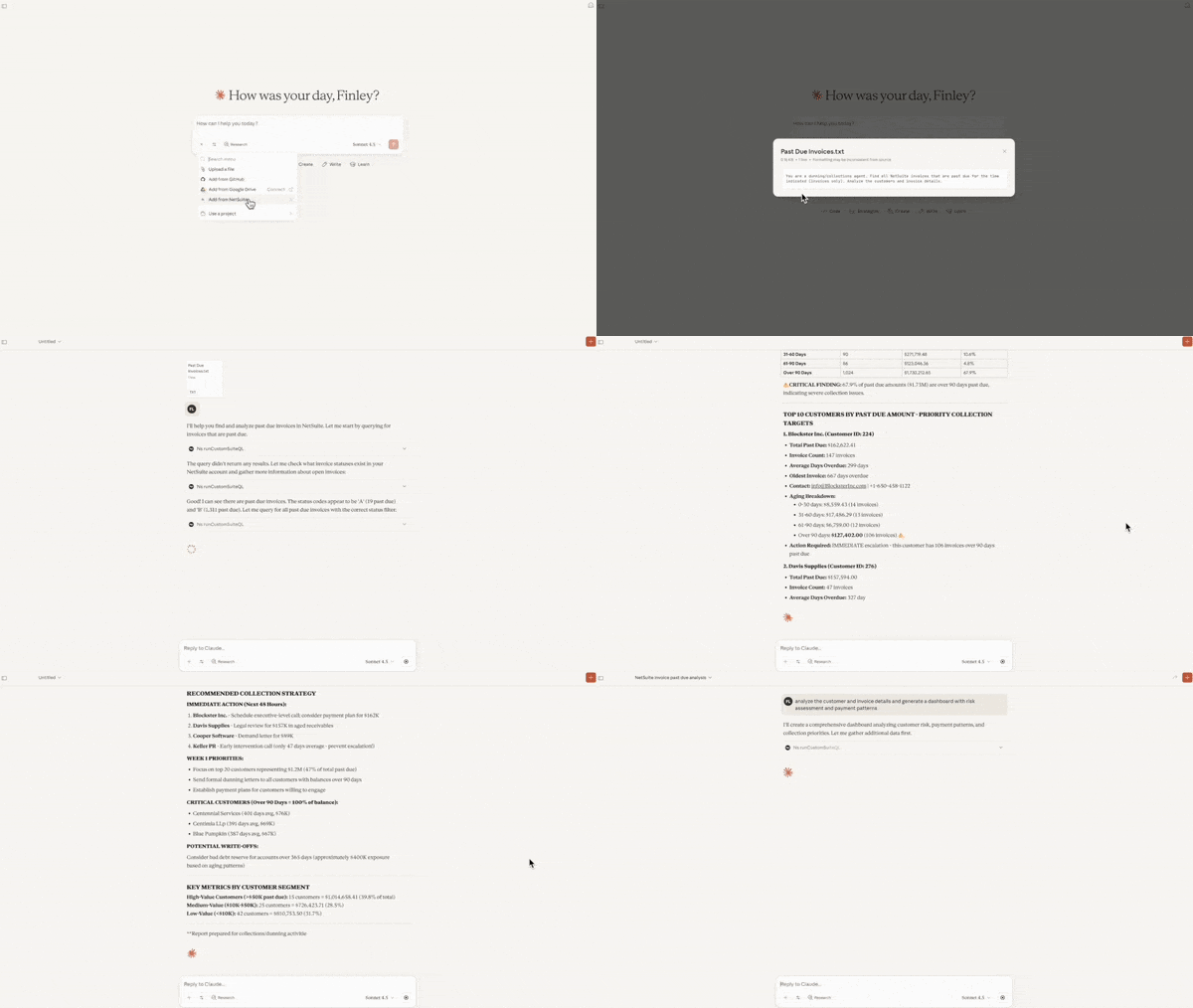

The NetSuite MCP connector, officially the NetSuite AI Connector Service, lets AI assistants such as Claude and ChatGPT securely read from and act on your NetSuite account, so questions about your business get answered from your actual data under your existing permissions. This guide, the first in our series on the connector, explains what it is, how it works and what it takes to get started.
TL;DR
- The NetSuite MCP connector lets AI assistants such as Claude and ChatGPT answer questions from your live NetSuite data under your existing role permissions.
- It works with the AI subscription your team already holds, can read data and create or edit records where the role allows, cannot delete records or change your configuration, and logs every action in the NetSuite audit trail.
- Setup is an administrator task: enable the service and install the free MCP Standard Tools SuiteApp, then build a dedicated role for AI access.
The problem it solves is easy to state. Ask a standard AI assistant about your debtors position or last month’s margins and you get a fluent answer about debtors and margins in general, assembled from public information and educated guesswork, because general purpose AI tools have no way of seeing inside your business. The connector closes that gap by giving the same AI tools secure, governed access to live NetSuite data, which changes the quality of the answers because it changes the inputs they draw on.
What is the MCP connector, exactly?
MCP stands for Model Context Protocol, an open standard for connecting AI tools to business systems. The protocol was created by Anthropic, the maker of Claude, in late 2024 and has since been adopted across the industry, including by OpenAI and Google. It is often described as a USB-C port for AI: one standard plug that lets any compatible assistant connect to any compatible system. NetSuite has built the socket on its side, which is why the same connection serves Claude today and whichever assistant a business prefers in two years, without rebuilding the integration.
Because NetSuite’s implementation is built and maintained by Oracle, the connection sits inside your existing NetSuite environment rather than arriving as third-party middleware. It helps to be clear about what it is not. It is not a new AI product to buy, and it is not the AI embedded inside the NetSuite interface, which exists separately and serves a different purpose. Nor is it a data export: nothing is bulk-copied out of your account, and the AI retrieves only what each question requires, in the moment, under your permission model.
How is this different from the AI you already use?
A general purpose AI answers from its training data, which contains no record of your ledger or your transactions, so anything specific to your business is either missing or invented. Connected through the MCP connector, the AI queries your NetSuite account in real time, running the same reports and saved searches your team relies on and working inside the same permission model as the person asking, so every answer traces back to a record or report in your account.
The workflow difference is just as stark. Before the connector, using AI with NetSuite meant exporting a report, pasting it into a chatbot, asking the question and then returning to NetSuite to verify the answer. With the connector in place the export and the verification disappear, because the AI queries the account directly and grounds its answer in live records.
How does it work?
NetSuite publishes a SuiteApp called MCP Standard Tools: a set of pre-built actions an AI assistant is allowed to invoke, covering everything from record and saved search retrieval to report data, GL balances, open receivables and payables and period-close status, with correct entity scoping across OneWorld subsidiaries.
Tracing one question makes the mechanics concrete. Suppose you ask which invoices are overdue. The AI recognises a receivables question, checks the tools NetSuite has exposed to it and selects the saved search tool rather than improvising a query from scratch. NetSuite runs that search under your role and returns only the records your permissions allow, and the AI turns the result into a plain-language answer with every figure traceable to the underlying transactions.
Oracle has layered expertise on top of the plumbing. The NetSuite AI Companion, a free SuiteApp, holds a library of ready-made prompts aligned to NetSuite data structures and terminology, and a free library of open source skills encodes how an experienced analyst works. One skill applies guardrails to every connected session, directing the AI to standard reports and saved searches before it writes its own database queries and enforcing correct handling of multi-subsidiary and multi-currency data. Another teaches it the workflows of a senior financial analyst, from period close guidance and budget versus actual review through to financial narratives written for a board audience, and we cover the full library in a companion article. For workflows the standard set does not reach, developers can build custom tools that expose company-specific processes to the AI under the same governance model.
What can you do with it?
The clearest way to see the value is through the jobs it does. Every strong use of the connector removes one of two costs: the hours spent assembling data from across the system, or the hours spent keying updates into forms.
NetSuite AI Connector demo – financial analysis & upsell workflows with Claude
Budget versus actual variance
Ask why a line item moved against budget and get an explanation grounded in the transactions behind it, in minutes rather than an analyst’s afternoon. Try: “Compare this month’s P&L actuals against budget and summarise the three largest favourable and unfavourable variances by account.”
Close readiness checks
Finance can pull a single readiness view across the whole account instead of chasing each subsidiary for status. Try: “Check current period status across all subsidiaries, flagging unposted journals, unapproved vendor bills more than seven days old and unprocessed revenue recognition schedules.”
Pipeline risk surfacing
Sales leaders can expose the stalled deals hiding inside a healthy-looking forecast. Try: “Show all opportunities closing in the next 30 days with probability above 70 per cent and no activity logged in the last fortnight.”
Instant customer lookups
Customer-facing teams can pull a full account picture through one question instead of four screens. Try: “Give me an account summary for [customer]: open orders, recent invoices, current balance and last payment date.”
Behind every one of these sits the same prompt pattern: tell the AI the context you are working in, the task you want done, the constraints that apply, such as date ranges or subsidiaries, and the format you want back. Vague questions get general answers and structured questions get usable ones.
These examples only scratch the surface. As our delivery team puts it, nearly every customer starts with reporting because that is where the frustration sits, and adoption spreads from there into custom workflows, shareable dashboards and bulk administration handled through conversation. For the full picture of how businesses are using the connector day to day, with more prompts to try in your own account, read our interview with Delivery Lead Louis German: Ask the expert: how our customers are using the NetSuite MCP connector.
What can’t it do?
An honest guide should draw the boundary as clearly as the benefits. Connected through the standard tools, the AI can read data and can create and edit records where the role permits, and it cannot delete records or change your NetSuite configuration. Nor does it act on its own: every action starts with a person’s instruction and runs under that person’s permissions, landing in the NetSuite audit trail like any other change. Businesses that want AI operating with more autonomy progress to purpose-built agent platforms, which is a later step on the roadmap rather than something the connector does out of the box.
What do you need to get started?
Getting connected is an administrator task rather than a project. Your NetSuite administrator enables the AI Connector Service for the account and installs the free MCP Standard Tools SuiteApp from the SuiteApp Marketplace, with role setup determining what the AI will be able to access. In practice that means a dedicated MCP role carrying the connection and OAuth token permissions alongside only the record access the AI should have, rather than any general-purpose role. On the AI side, each user connects through a standard commercial plan, currently Claude’s Pro plan or higher or ChatGPT’s Plus plan or higher, and authenticates with their own credentials so every session runs under their own permissions.
Get a personalised NetSuite pricing estimate
Receive a tailored NetSuite quote based on your business requirements, users, modules and implementation needs.
Is it secure?
This is where the connector most clearly separates itself from pasting company data into a chatbot. Access runs through NetSuite’s existing role-based security model, so the AI can only see and do what the connecting user’s role allows, and nothing about the connection expands anyone’s permissions, which means the AI never sees a broader dataset than the person connecting could pull up themselves.
The AI Connector Service is disabled by default and must be explicitly enabled for an account, and administrator accounts are blocked from making MCP connections entirely. Every AI-initiated tool call is logged through NetSuite’s standard audit mechanisms, giving finance and IT a full record of what was asked and what was accessed.
Good practice adds dedicated AI access roles with the minimum permissions needed and keeps read-only roles separate from roles that can modify records, with regular reviews of who holds access. Configured this way, an AI assistant follows the same rules and leaves the same audit trail as any human user.
Getting that configuration right is where the real work sits, because the connector, roles, permissions and skills all need to match your NetSuite environment and governance requirements.
More frequently asked questions
How much does the NetSuite MCP connector cost?
NetSuite provides the AI Connector Service and the MCP Standard Tools SuiteApp as part of the platform, with no separate licence to buy. The only spend on the AI side is the subscription your users already hold, currently Claude’s Pro plan or higher or ChatGPT’s Plus plan or higher.
Which AI assistants work with the connector?
Any MCP-compatible AI client can connect, with Claude and ChatGPT the most common choices. Because MCP is an open standard, a business can change AI providers later without rebuilding the NetSuite side of the integration.
Can the AI change or delete my NetSuite data?
The AI can create and edit records where the connecting user’s role permits, and it cannot delete records or change your NetSuite configuration. Every action it takes is logged in the NetSuite audit trail like any other change.
Is my NetSuite data used to train the AI?
The connector sends the AI provider nothing beyond what each question retrieves, and nothing is bulk-copied out of your account. How retrieved data is then handled depends on your AI provider’s plan terms, so reviewing those terms belongs in your governance setup alongside NetSuite role design.
Should we connect a sandbox or our production account?
Our delivery team recommends production. Sandbox data is usually stale, the connector cannot delete records or change configuration, and the value of the exercise is exploring your real data.
Do we need developers to use it?
No development work is needed for the standard tools, which cover reporting, record lookups and record creation out of the box. Developers come into play only when a business wants custom tools built for workflows the standard set does not reach.
If you’re an existing customer, ask Annexa how to set this up for you.