
Last Updated on 21 September 2026
Most organisations reach a point where the tools they started with stop being enough. Accounting software manages the books, a CRM holds customer data, inventory runs somewhere else, and reporting means pulling spreadsheets together on a Friday afternoon. NetSuite is the platform that replaces all of that with a single connected system – and for over 43,000 businesses globally, it has become the operational backbone they scale on.
TL;DR
- NetSuite is Oracle’s cloud-based ERP platform, used by over 43,000 businesses worldwide including hundreds across Australia and New Zealand
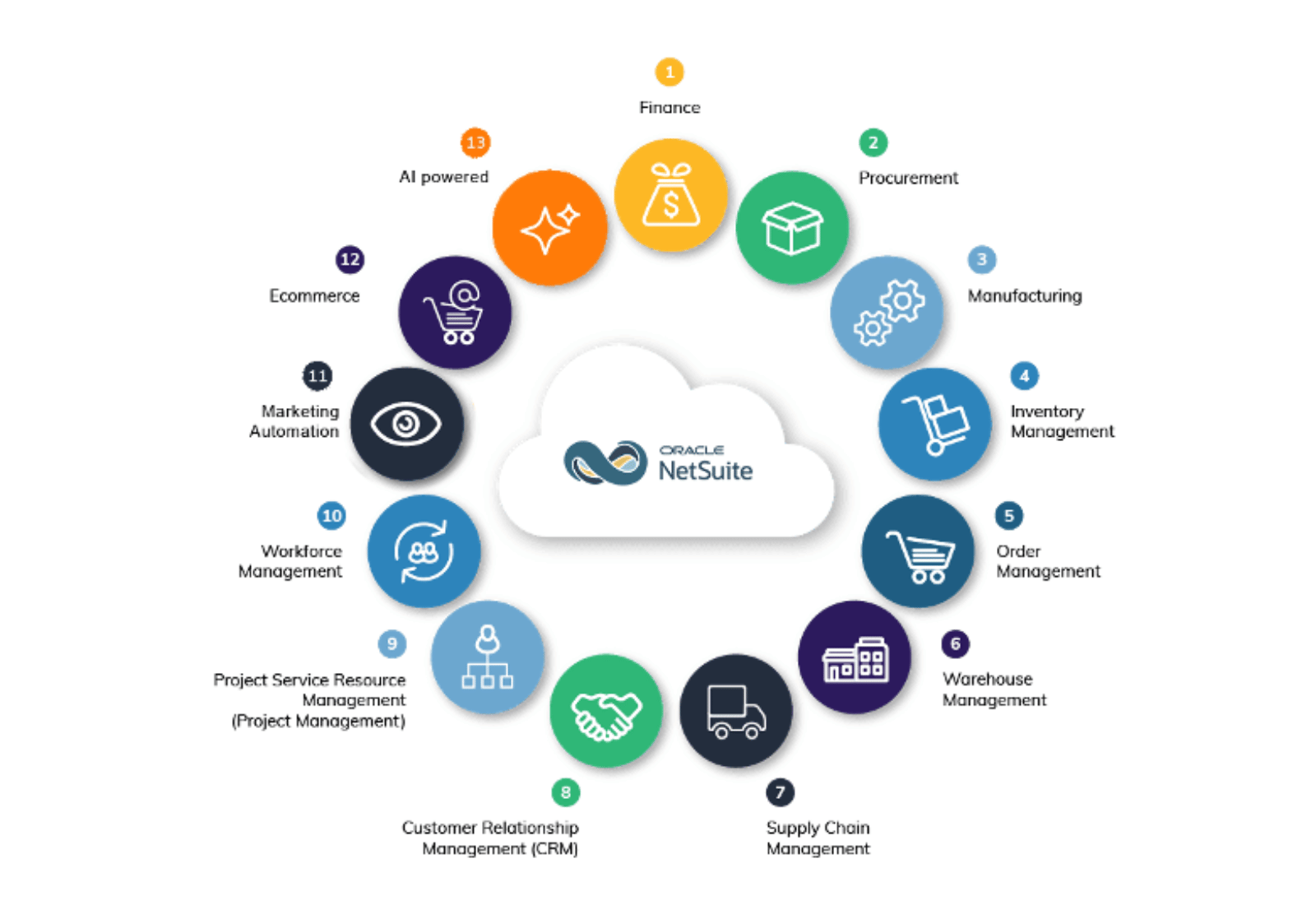
- It connects financial management, inventory, supply chain, CRM, eCommerce, HR and reporting in a single system
- For ANZ businesses, it includes built-in GST compliance, BAS reporting, multi-currency support and Single Touch Payroll
- AI is now embedded across core finance workflows, including reconciliation, close management and forecasting
- NetSuite Next – Oracle’s most significant platform overhaul in years – is rolling out through 2026 and 2027, with ANZ expected in the first half of 2027
- Pricing is subscription-based; implementation typically takes three to six months for mid-market businesses
What is NetSuite?
NetSuite is Oracle’s cloud-based enterprise resource planning platform. It manages the core operations of a business – finance, inventory, procurement, supply chain, manufacturing, CRM, eCommerce and HR – in a single integrated system, on a shared database, updated in real time.
It is not a collection of tools that have been stitched together. Every module shares the same underlying data. When a sales order is placed, inventory updates. When inventory moves, the general ledger reflects it. When an invoice is paid, cash flow reporting adjusts automatically. There is no re-entry, no reconciliation between systems and no version of the truth that depends on which platform you are looking at.
NetSuite was founded in 1998 – making it one of the first cloud-based business applications ever built – and acquired by Oracle in 2016. It is updated twice yearly through Oracle’s standard release cycle, which means customers always run the current version without managing upgrades themselves.
For Australian and New Zealand businesses, NetSuite sits in a useful position in the market. It is more capable than accounting software like Xero or MYOB Acumatica, which were built for financial management rather than full business operations. It is more accessible than enterprise platforms like SAP, which carry the complexity and cost that comes with targeting the largest global organisations. The mid-market – businesses turning over roughly $10 million to several hundred million annually – is where NetSuite has the deepest ANZ penetration, and where it typically delivers the most immediate operational return.
How NetSuite works
NetSuite runs in the cloud, accessed through a browser, with no software to install or infrastructure to maintain. Oracle manages hosting, security, updates and uptime. For businesses that have previously run on-premise systems with their own servers and IT overhead, this is a material change in how they think about ERP.
The platform uses role-based dashboards, meaning each user sees information relevant to their function. A CFO’s home screen shows financial performance, cash flow and period-close status. A warehouse manager sees stock levels, pending fulfilment and inbound purchase orders. A sales rep sees their pipeline, customer payment history and order status. Everyone works from the same underlying data, filtered to what matters for their role.
Workflow automation handles the processes that would otherwise require manual action. Purchase orders can be routed for approval based on value thresholds. Invoices generate automatically when goods ship. Financial reports update as transactions post. Alerts trigger when exceptions occur – a customer exceeding their credit limit, a stock level falling below reorder point, a budget variance exceeding a set threshold.
For ANZ businesses specifically, NetSuite includes localisation for GST, BAS preparation and ATO-compliant reporting in Australia, IRD requirements in New Zealand, Single Touch Payroll, and multi-currency support for businesses trading internationally or managing trans-Tasman operations.
Core NetSuite modules
NetSuite is modular, meaning businesses implement what they need and expand over time. These are the core areas.
Financial management
The financial module is the foundation. It covers the general ledger, accounts payable and receivable, bank reconciliation, fixed assets, multi-currency transactions, multi-entity consolidation and financial reporting. For ANZ businesses with subsidiaries or international operations, this includes managing multiple entities and tax jurisdictions from a single chart of accounts – a capability that accounting software like Xero was not built to handle at scale.
Inventory and supply chain management
Real-time inventory tracking across multiple locations gives businesses complete visibility into stock levels, movements and valuations. Reorder points can be automated, demand forecasting draws on historical sales data, and procurement workflows connect purchasing to finance without manual handoffs. For businesses with offshore sourcing – common in ANZ retail, manufacturing and wholesale distribution – landed cost tracking and supplier management sit within the same system as the rest of the operation.
Warehouse management
NetSuite’s warehouse management system adds functionality for businesses with complex distribution requirements: barcode scanning, pick-and-pack optimisation, bin and lot tracking, and returns processing. Warehouse teams work from the same inventory data as finance and sales, which eliminates the version-of-truth problem that causes fulfilment errors in businesses running disconnected systems.
Manufacturing
For businesses that produce goods, NetSuite manufacturing manages bills of materials, production scheduling, work orders, shop floor control and quality management. Material costs, labour and overhead flow automatically into product costing rather than being calculated in a separate system. Work-in-progress is tracked in real time, giving operations and finance a shared view of production status and cost.
CRM and sales
NetSuite CRM connects customer interactions, quotes, orders, payment history and service cases in one place. Because it sits within the same platform as finance and operations, sales teams have access to credit status, outstanding invoices and order history when they need it – without relying on finance to pull a report. Pipeline management, sales forecasting and marketing campaign tools are included natively.
eCommerce
SuiteCommerce connects online stores directly with inventory, financial and customer management systems. Orders placed online update stock levels in real time, trigger fulfilment workflows and create the corresponding financial entries – all without integration middleware. For ANZ retailers managing both online and physical channels, this removes one of the most common sources of inventory discrepancy and manual reconciliation.
Human resources and payroll
HR modules cover employee records, time and attendance, leave management, expense tracking and performance management. In Australia and New Zealand, where payroll compliance requirements – Single Touch Payroll, the Holidays Act in New Zealand, award interpretation and superannuation – are particularly complex, having HR and payroll within the same system as finance reduces compliance risk and administrative overhead.
Reporting and business intelligence
Real-time reporting across all functions means finance leaders can access live dashboards covering cash flow, revenue by segment, gross margin by product line and outstanding receivables at any point – not just at month-end. Saved searches, custom reports and role-based KPI dashboards are configurable without developer involvement.
Get a personalised NetSuite pricing estimate
Receive a tailored NetSuite quote based on your business requirements, users, modules and implementation needs.
NetSuite vs other business systems
NetSuite vs Xero and MYOB Acumatica
Xero and MYOB Acumatica are accounting platforms. They manage financial transactions well and are the right tool for businesses in their early stages. The constraint appears when a business needs to manage inventory across multiple locations, consolidate reporting across entities, automate procurement workflows or connect operations and finance in real time. These are not gaps that integrations reliably close – they reflect a fundamental difference in what the platforms were built to do.
Most ANZ businesses that move to NetSuite from Xero or MYOB do so because operational complexity has outpaced what an accounting-first platform can handle. Read more > NetSuite vs Xero and NetSuite vs MYOB Acumatica.
NetSuite vs QuickBooks
QuickBooks serves small businesses with basic accounting needs. Like Xero and MYOB, it was not designed for operational complexity at scale. Businesses running QuickBooks that are adding inventory management, multi-entity reporting or supply chain requirements will find the platform’s ceiling quickly. Read more > NetSuite vs QuickBooks.
NetSuite vs Microsoft Dynamics 365
Dynamics 365 is a capable platform with strong CRM roots and a modular structure. The practical considerations for ANZ mid-market businesses typically come down to implementation complexity, the degree of customisation required to match ANZ compliance requirements, and total cost of ownership when all required modules are included. Read more > NetSuite vs Microsoft Dynamics 365.
NetSuite vs SAP
SAP S/4HANA targets large enterprises with complex global operations. For ANZ mid-market businesses, the implementation cost, timeline and ongoing administrative overhead associated with SAP typically makes NetSuite the more practical choice. Read more > NetSuite vs SAP S/4HANA.
Which industries use NetSuite in Australia and New Zealand?
NetSuite has broad industry coverage, but ANZ adoption is strongest in several sectors.
Wholesale distribution businesses use NetSuite’s inventory, procurement and supply chain capabilities to manage complex fulfilment operations, offshore sourcing and multi-location stock. Retail and eCommerce businesses use SuiteCommerce and native inventory integration to unify online and physical channels. Manufacturers run production planning, work order management and cost accounting within the same system as finance and sales.
Professional services firms use NetSuite’s project management, time tracking and billing capabilities to manage project profitability and client reporting. Technology and SaaS businesses use subscription billing, revenue recognition and scalable architecture to support rapid growth. Not-for-profits use NetSuite for fund accounting, grant compliance and multi-entity consolidation.
NetSuite AI in 2026
AI has moved from a feature listed in NetSuite’s release notes to a functional part of how finance and operations teams work day to day. The 2026.1 release introduced several capabilities worth understanding.
Intelligent Close Manager
NetSuite Intelligent Close Manager provides AI-driven monitoring of the financial close process. It surfaces emerging discrepancies, unusual trends and activities that may delay the close, and allows teams to navigate directly from those insights to the relevant task or transaction. Exception management flags potential payment risks by identifying unusual changes to vendor information close to payment events.
AI-assisted reconciliation and transaction matching
AI assistants in NetSuite Account Reconciliation help automate reconciliation setup by identifying newly created accounts, suggesting reconciliation formats and risk ratings based on prior cycles, and using machine learning to detect likely transaction matches that rule-based engines may miss. The system improves its suggestions over time as finance teams approve or reject matches.
Generative AI flux analysis detects material balance fluctuations and produces draft variance explanations in plain language. Finance teams review and refine these narratives rather than preparing them from scratch.
AI forecasting and planning
Within NetSuite Planning and Budgeting, multivariate AI forecasting models now show which operational and financial variables are driving each projected outcome – rather than producing forecasts that are difficult to interrogate. In NetSuite Profitability and Cost Management, AI assistants help build cost allocation models and explain how costs move across the organisation.
AI across inventory, CRM and eCommerce
AI-driven demand forecasting in inventory management adjusts replenishment recommendations based on real-time signals rather than static historical averages, reducing both stockouts and excess stock. In CRM, AI-powered case summaries give service teams instant context on a customer’s history before a call. Across eCommerce, AI-assisted product recommendations surface relevant items based on buying patterns.
Read more > NetSuite AI in 2026: what’s available now, what’s coming next and how to prepare
What is NetSuite Next?
NetSuite Next is Oracle’s most significant platform overhaul since the product launched. Announced at SuiteWorld 2025, it introduces three substantial changes: a redesigned interface built on Oracle’s Redwood Design System, a natural language assistant called Ask Oracle, and an agentic AI framework that can take action across finance and operations workflows rather than just surfacing information.
The Redwood interface is available now as an opt-in toggle in the 2026.1 release. Ask Oracle and the agentic features are rolling out through 2026 in North America, with ANZ expected in the first half of 2027. Everything is included in existing NetSuite licences at no additional cost.
For ANZ businesses, the practical implication is that the platform arriving in your production environment over the next 12 months looks materially different from what you are running today. The finance and operations teams that will get the most from it are the ones that have invested in clean, well-governed NetSuite data before it arrives.
Read more > NetSuite Next: preparing for NetSuite’s biggest platform overhaul
NetSuite implementation
Implementing NetSuite is a business transformation project, not a software installation. The businesses that get the most from it treat it that way from the start.
A typical implementation involves requirements gathering and scoping, data migration from existing systems, configuration of the platform to the business’s specific processes, integration with third-party systems that will remain in the stack, user training and a period of parallel running before go-live.
NetSuite’s SuiteSuccess methodology provides industry-specific pre-configurations and best practices developed across 25 years of ERP deployments. Rather than starting from a blank system, businesses begin with workflows, reports and dashboards tailored to their industry. This is how many implementations reach go-live in 100 days or less – though mid-market businesses with more complex requirements typically take three to six months.
In ANZ, local implementation expertise matters beyond knowing the software. GST, BAS reporting, Single Touch Payroll, the Holidays Act, multi-currency for trans-Tasman operations and the compliance requirements of regulated industries all require configuration that a global template will not address by default.
Read more > NetSuite implementation success guide for growing Australian and New Zealand businesses
NetSuite pricing
NetSuite is priced on a subscription model. The total cost depends on the modules selected, the number of users and their access levels, the degree of customisation required, and implementation and ongoing support.
For ANZ mid-market businesses, total first-year cost – including licence, implementation, data migration and support – typically ranges from $50,000 to several hundred thousand dollars depending on scope and complexity. The relevant comparison is not the headline licence fee against an accounting package, but the total cost of ownership against the combination of tools NetSuite replaces, plus the integration and reconciliation overhead that comes with running them separately.
For a detailed breakdown of licensing fees, implementation costs and the factors that influence pricing for ANZ businesses, read our comprehensive guide.
Read more > How much does NetSuite cost in Australia and New Zealand?
Get a personalised NetSuite pricing estimate
Receive a tailored NetSuite quote based on your business requirements, users, modules and implementation needs.
How Annexa supports your NetSuite journey
Annexa is a dedicated NetSuite partner with over 200 successful implementations across Australia and New Zealand. Our team of 30 NetSuite consultants brings industry-specific expertise across retail, distribution, manufacturing, professional services, technology and not-for-profit – and we were recognised as the 2024 NetSuite ANZ Growth Partner of the Year.
We work with businesses from initial scoping through implementation, integration, training and ongoing optimisation. If you want to understand what NetSuite would look like for your specific business, get in touch with the Annexa team.
Read more > The complete guide to selecting a NetSuite implementation partner
FAQs
What does NetSuite do?
NetSuite connects a business’s core functions – finance, inventory, supply chain, CRM, eCommerce, HR and reporting – in a single cloud-based platform. Rather than managing separate tools that each hold their own version of data, NetSuite gives every part of the business access to the same information in real time.
Is NetSuite suitable for Australian and New Zealand businesses?
Yes. NetSuite includes localisation for GST, BAS reporting, ATO compliance, Single Touch Payroll and IRD requirements in New Zealand. Multi-currency support handles trans-Tasman and international operations. It is used by hundreds of ANZ businesses across manufacturing, distribution, retail, professional services and technology.
What size business is NetSuite designed for?
NetSuite is most commonly implemented by businesses turning over $5 million or more annually, with the strongest ANZ adoption in the $10 million to $200 million revenue range. It scales to the enterprise level – Oracle runs it across some of its own operations – but the mid-market is where it has the deepest penetration in Australia and New Zealand.
How long does NetSuite implementation take?
For mid-market businesses, typically three to six months. Simple configurations using SuiteSuccess can go live in 100 days or less. Complex customisations, large data migrations or multi-subsidiary implementations take longer. The key variable is usually the quality of existing data and the degree of process change involved.
Does NetSuite include CRM?
Yes. NetSuite CRM is built natively into the platform, not integrated after the fact. Customer records, transaction history, pipeline data and financial information all sit within the same data model. For businesses that want a dedicated CRM with advanced marketing automation, integrations with platforms like HubSpot and Salesforce are also available.
What is NetSuite Next?
NetSuite Next is Oracle’s most significant platform overhaul in the product’s history. It introduces a redesigned interface (Redwood), a natural language AI assistant (Ask Oracle) and an agentic AI framework capable of taking action across finance and operations workflows. It is included in existing licences. ANZ customers are expected to receive access in the first half of 2027.
How much does NetSuite cost?
NetSuite is priced on a subscription model based on modules, users and customisation requirements. For a detailed breakdown specific to ANZ businesses, see our pricing guide at info.annexa.com.au/netsuite-pricing.
What is the difference between NetSuite and Xero?
Xero is an accounting platform designed for small businesses managing financial transactions. NetSuite is a full ERP platform covering financial management, inventory, supply chain, CRM, eCommerce, manufacturing and HR. Most businesses move from Xero to NetSuite when operational complexity – multi-location inventory, multi-entity reporting, procurement workflows – exceeds what an accounting-first platform can handle.
Read more: