![Meet the new NetSuite AI Connector service plus demos [UPDATED MAY 2026]](https://annexa.com.au/wp-content/uploads/2025/08/NetSuite-AI-Connector.png)

Last Updated on 24 June 2026
In mid-August 2025, NetSuite announced its new AI Connector Service, calling it “a world of new possibilities for businesses”. Here’s everything you need to know to get started with NetSuite AI Connector service.
TL;DR
- What it is: An open, MCP-based bridge connecting external AI assistants (Claude, ChatGPT, Gemini) to NetSuite data, under your existing roles and audit trail.
- What’s new (March 2026): Companion with 100+ finance prompts, MCP Apps (Prompt Library, Report Picker, Record Picker), MCP-ready roles, and NetSuite Analytics Warehouse support.
- Why it matters: Bring your own AI to NetSuite without rebuilding integrations or buying separate engines.
It’s the boldest AI move we’ve seen from NetSuite so far. Its ability to blend trusted ERP data with the fast-moving AI ecosystem could well be the catalyst that transforms NetSuite’s role from a trusted system of record into an engine for next-generation AI opportunities.
At Annexa, we’ve been hands-on exploring use cases and capabilities since the NetSuite AI Connector Service hit our inboxes. And we’ll keep you updated as we progress but for now, here’s a quick explainer of the all-new NetSuite AI Connector – what it is and what it means for you.
Product update alert – Scroll down for the March 2026 update
What is the NetSuite AI Connector Service?
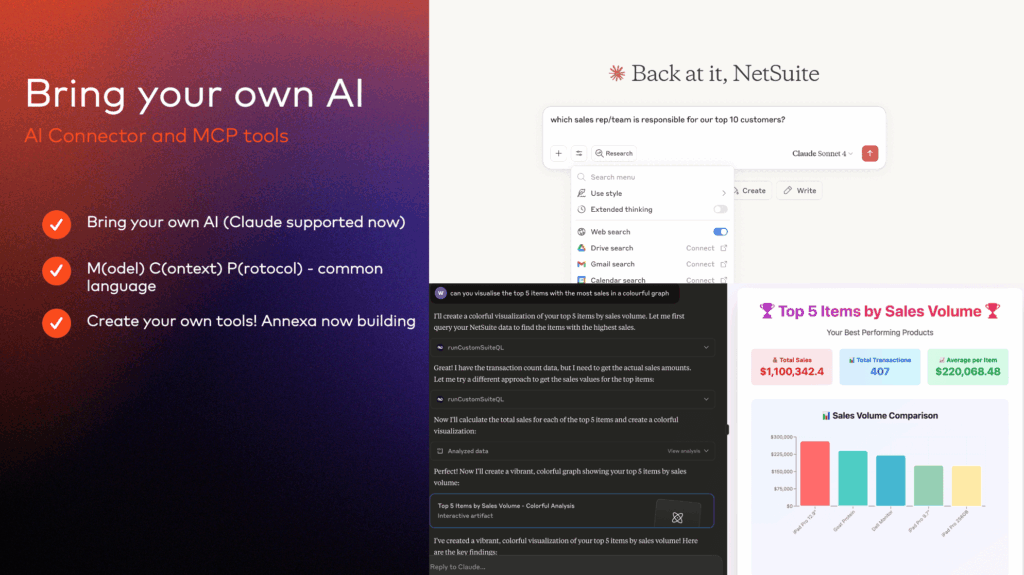
NetSuite’s new AI connector is essentially a safe bridge between your ERP data and an external assistant. Right now, that assistant is Claude and the connection works through something called Model Context Protocol (MCP). You don’t need to know the nuts and bolts of MCP – just think of it as a common language that lets an AI call specific NetSuite tools.
The connector runs through a chat interface. You open NetSuite in one tab, Claude in another and once connected you can simply type natural-language prompts: “Show me my top five customers last year” or “Compare my purchase order pricing on red widgets with current wholesale rates.” The assistant figures out which NetSuite tools to call, combines results if needed and delivers the answer back in a conversational flow.
Importantly, the assistant only does what your NetSuite role already allows. If your role in NetSuite only allows access to sales reports, that’s all the AI sees. If you don’t have rights to change pricing, it won’t be able to do that either. Note also that admin roles are deliberately blocked to avoid anyone running powerful actions unchecked. This means that everything stays logged in NetSuite the same way it would if you were running the query yourself. In other words, the AI isn’t a backdoor, it’s just a different way of interacting with the system.
Get a personalised NetSuite pricing estimate
Receive a tailored NetSuite quote based on your business requirements, users, modules and implementation needs.
Two demos of the NetSuite Connector Service
The March 2026 update: what it means for NetSuite users
At SuiteConnect London on 31 March 2026, NetSuite announced a substantial expansion of the AI Connector Service. The original release opened the door to AI. This update is what makes the connector usable day-to-day, and it lands across four areas that map to the questions NetSuite users have been asking since launch.
“I don’t know what to ask the AI.”
The AI Connector Service Companion is NetSuite’s answer. It ships with a curated library of more than 100 finance-aligned prompt templates, all structured around NetSuite’s data model, permissions and terminology. Instead of starting from a blank prompt, users can search, select and run proven queries, or adapt them to suit their role and process. It effectively turns general-purpose AI into something that behaves more like a NetSuite-native assistant.
The Companion also includes Skills, which are reusable NetSuite-specific instructions, context and best practices that supported AI models draw on automatically. Skills help the AI understand your terminology, custom fields and numbering rules without your team having to spell that out in every prompt.
“Typing prompts is hit-and-miss. I want something that feels like NetSuite.”
That is what MCP Apps deliver. Rather than relying on free-text prompts, users interact with NetSuite through structured menus, selectors and forms, rendered directly inside the AI assistant. The first release includes a Prompt Library, Report Picker and Record Picker.
In practice, this means a user inside Claude or ChatGPT can click into the Report Picker, choose a saved Profit & Loss report, set the date range and subsidiary filters in a familiar form, and have the AI run it. Role-based access still applies underneath, so the menus only ever show what the user is permitted to see or do in NetSuite.
“I need to be sure the right people have the right access.”
NetSuite has introduced MCP-ready roles, which are preconfigured access patterns mapped to common finance positions: CFO, Controller, Accounts Receivable Analyst, Accounts Payable Analyst and Treasury Analyst. Rather than designing AI permissions from scratch, customers can start with NetSuite’s templates and tailor from there. For partners like Annexa, this makes early rollouts faster and easier to govern.
“The AI cannot see my reports or warehouse data.”
That has been one of the most-flagged limitations of the original release. The March update extends the AI Connector to NetSuite Analytics Warehouse, widening the data the AI can reason over to include historical, analytical and external data sets. The result is broader forecasting, trend analysis and cross-system reporting, without the custom configuration workarounds early adopters had to build.
Example of a prompt in AI connector companion
One example is a built-in prompt that generates a detailed audit report of customisations within your NetSuite environment.
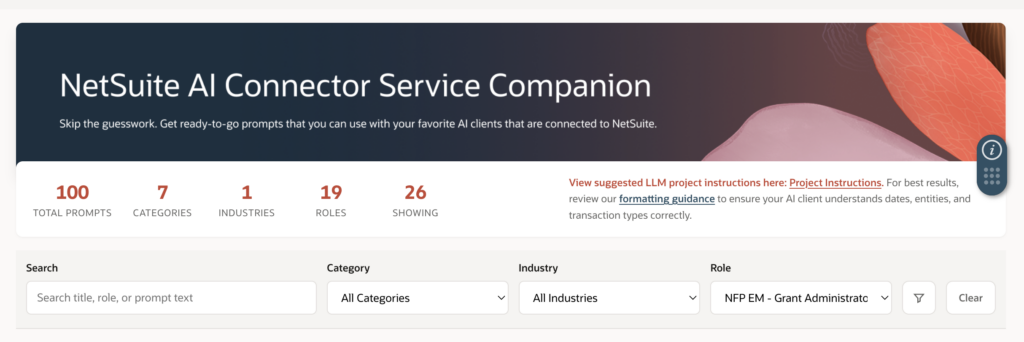
Central workspace showing a searchable prompt library organised by finance workflows, roles and common use cases, giving users a structured starting point for interacting with AI inside NetSuite.
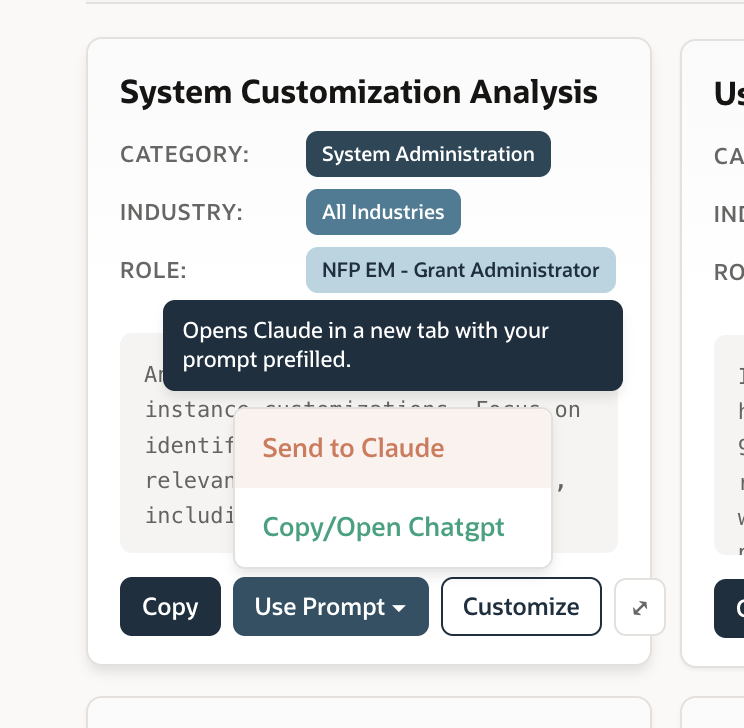
Example of a finance-aligned prompt template designed to generate a detailed audit report of NetSuite customisations, removing the need to manually gather and interpret configuration data.
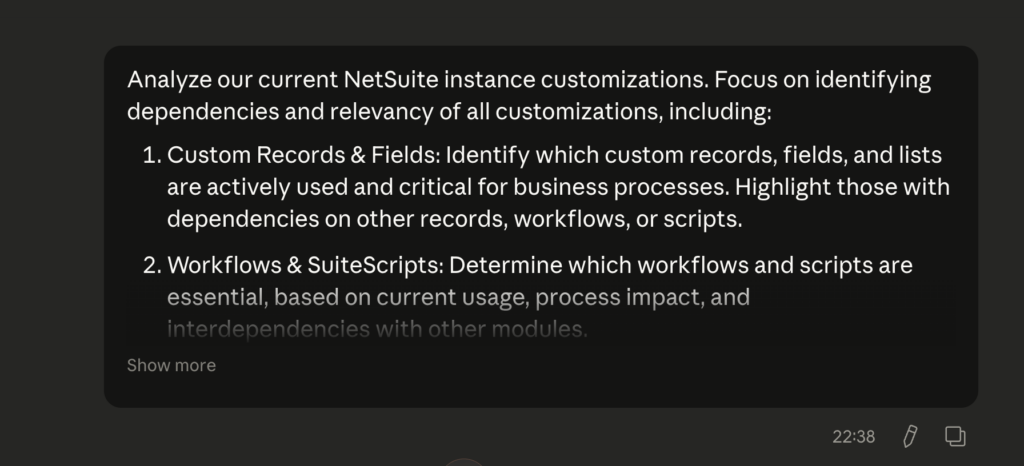
Pre-configured prompt setup aligned to NetSuite’s data model, permissions and terminology, helping ensure outputs are relevant, consistent and grounded in the system.
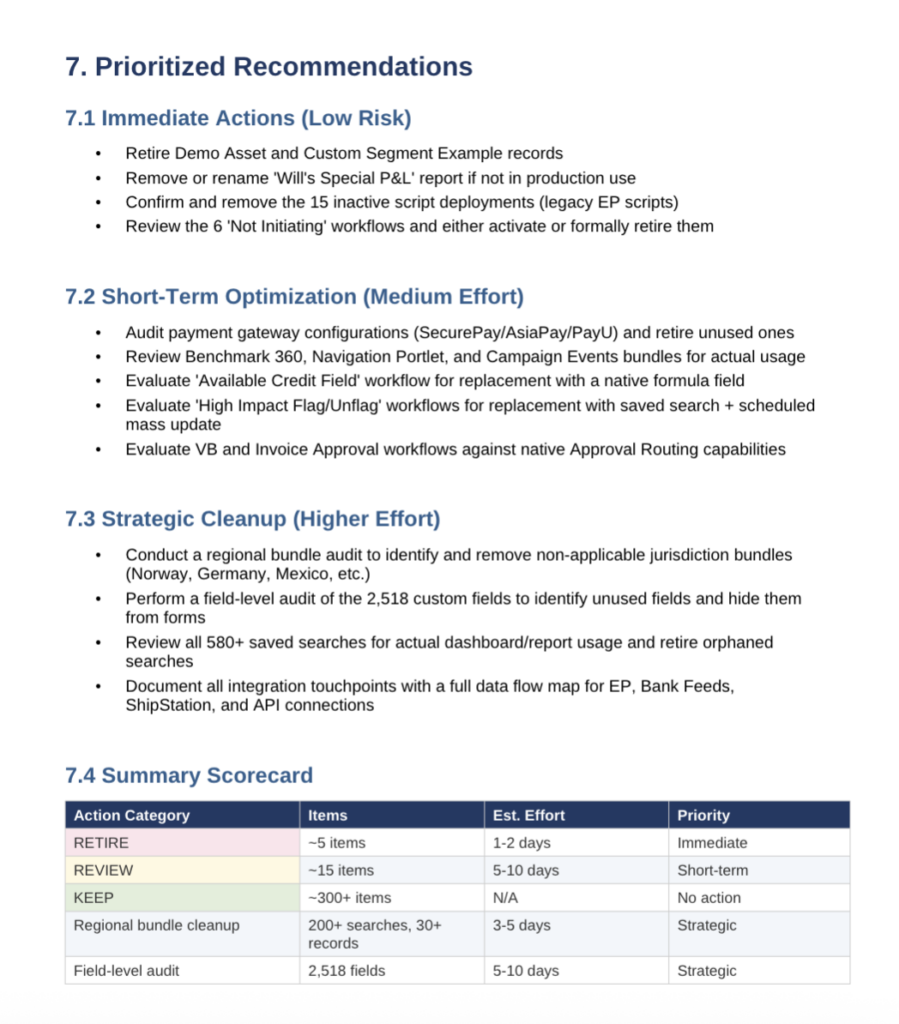
Consolidated output generated from a single guided prompt, bringing together multiple data points into a structured view that supports faster review and decision-making.
Why the NetSuite AI Connector matters strategically
“While we call it an integration service, it’s more than that – it’s a foundational step in making NetSuite the most intelligent, extensible, and AI-ready ERP system. The NetSuite AI Connector Service gives customers a secure, flexible, and scalable way to connect their own AI to NetSuite.”
- Brian Chess, Senior Vice President of Technology and AI at Oracle NetSuite, explains:
If you’ve been waiting for NetSuite’s big AI announcement, this is it.
NetSuite can’t possibly pre-build every AI feature customers will want. So, rather than ship a long list of fixed, embedded capabilities, it has taken an open, “bring your own assistant” path. The AI Connector gives you a controlled doorway into NetSuite using the MCP, so you define exactly what an assistant can see and do under your existing roles and audit trails.
Plus, if you’ve got the underlying licence, you get the AI features. You don’t need to keep buying external engines just to experiment with AI.
At the same time, the connector is a different kind of move. It opens NetSuite up to the wider AI ecosystem – Claude today, and potentially ChatGPT and many others in time. With those external connections, suddenly, customers can tap into familiar AI models, layer them over NetSuite data and experiment with new use cases that aren’t yet covered natively in NetSuite’s roadmap.
While the AI Connector Service adds new features, it also positions NetSuite customers at the intersection of NetSuite’s built-in AI roadmap and the fast-moving external AI market. One foot in the safe, subscription-based upgrades from NetSuite, and one foot in the open world of Claude, ChatGPT and whatever comes next.
Get a personalised NetSuite pricing estimate
Receive a tailored NetSuite quote based on your business requirements, users, modules and implementation needs.
What is possible out of the box right now
The built-in tools have come a long way since launch. You can query data with SuiteQL, pull reports, look up customer or item information, and access NetSuite Analytics Warehouse for historical and analytical data. The built-in write actions remain narrow, with create and update of customer records the headline example.
Where it gets more powerful is in extension. Developers can expose additional SuiteScript tools, so you can go beyond the basics to things like updating pricing or creating sales orders, all still wrapped in your role’s permissions. MCP Apps add a second layer of accessibility on top, replacing free-text prompts with structured menus and forms for the most common tasks.
Even in these early days, the possibilities are obvious. Rapid customer summaries without building saved searches. Blending NetSuite data with external context, like comparing purchase order costs to live market rates. Prototyping lightweight operational helpers such as visual scheduling boards or clean CSV exports.
It is also fast and flexible, and because it all runs through chat, it is immediately accessible to business users.
The bigger picture
What Oracle NetSuite has built is the foundation of an agent ecosystem for ERP. By using MCP as the protocol, NetSuite has decoupled your AI choices from your ERP stack. You can change models or switch assistants without ripping up integrations.
For partners like Annexa, this is equally significant. The design turns AI work from one-off scripts into modular software, delivered and governed as SuiteApps. Oracle has already published a sample SuiteApp to get customers started. The logical next step will be a wave of partner-built AI SuiteApps – effectively productising AI use cases for the SuiteApp Marketplace.
For customers, it means experimentation is safe. You can start small with read-only tools in a sandbox, validate inputs, add narrow write actions when ready – and always keep a human in the loop for sensitive steps. Because it runs under existing roles and audit trails, adoption is easier to explain to risk committees and auditors.
How do I get started with the NetSuite AI Connector Service?
The AI Connector is available now and lets you integrate AI assistants with your NetSuite ERP. To begin, install the “MCP Standard Tools” SuiteApp from the SuiteApp Marketplace, which delivers a governed interface that the assistant can safely call, including the ability to run SuiteQL queries under your own role-based permissions. After installation, you will launch the connector using the MCP client, and any tools you expose appear based on your assigned permissions. Every interaction is logged via NetSuite’s audit trail, helping finance and IT teams maintain full control. For setup guidance and permissions configuration, refer to the NetSuite Help Center.
The Companion and Analytics Warehouse extension are available now in English worldwide, with more languages planned. MCP Apps are rolling out through the SuiteApp Marketplace as part of the MCP Standard Tools SuiteApp.
Frequently asked questions
What is the NetSuite AI Connector Service?
It’s a secure, governed bridge between your NetSuite ERP data and an external AI assistant (such as Claude, ChatGPT or Gemini). It uses the Model Context Protocol (MCP) – an open standard – so you’re not locked into one AI model. Every interaction runs under your existing NetSuite role and is captured in the audit trail.
Which AI assistants does the NetSuite AI Connector work with?
Claude was the first supported assistant at launch. ChatGPT and Gemini have since been added. Because the connector uses MCP, support for additional AI clients is expected to grow over time. (Note: as of 4 March 2026, ChatGPT changed how its callback URL works, so each new ChatGPT connection now requires a new integration record in NetSuite.)
Is the NetSuite AI Connector secure?
Yes. The assistant can only see and do what your NetSuite role permits, and admin roles are deliberately blocked from connector use. Every query and action is logged in NetSuite’s audit trail, exactly as if you’d run it yourself. You can also disable the integration at any time, or allocate part of your concurrency limit to it.
Do I need to write complex prompts to use the connector?
The Companion ships with more than 100 finance-aligned prompt templates ready to run, and the new MCP Apps let you navigate NetSuite data using structured menus and selectors inside the AI assistant. Both make it straightforward to get value without prompt engineering expertise.
What’s the difference between the Companion and MCP Apps?
The Companion is a curated library of pre-built prompts, Skills and MCP-ready roles that make text-based AI interactions more reliable. MCP Apps go a step further by rendering NetSuite-style interfaces (Report Picker, Record Picker, Prompt Library) directly inside the AI assistant, so users can point-and-click rather than type prompts.
Can the AI pull data from NetSuite reports and Analytics Warehouse?
Out of the box, the connector supports SuiteQL queries, customer and item lookups, and limited write actions. Access to standard NetSuite reports has historically required custom configuration. The March 2026 update added expanded support for NetSuite Analytics Warehouse, opening up historical, analytical and external data for AI analysis.
How do I get started?
Install the “MCP Standard Tools” SuiteApp from the SuiteApp Marketplace, configure the MCP role and permissions, then connect your chosen AI client. We recommend starting in a sandbox with read-only tools, then gradually expanding into narrow write actions once you’re comfortable. If you’d like help scoping use cases or configuring roles, the Annexa team can walk you through it.
What does this mean for our existing NetSuite investment?
It extends it. If you’ve got the underlying licence, you get the AI features, so there’s no need to keep buying external engines just to experiment. More importantly, the connector decouples your AI choices from your ERP stack, so you can switch models or assistants over time without rebuilding integrations. It positions NetSuite customers right at the intersection of NetSuite’s built-in AI roadmap and the wider AI ecosystem.
Want to know more about the latest AI capabilities in NetSuite?
Watch the replay of our latest webinar: AI for finance leaders What to use now + what’s next – with live AI demos