
The best way to understand how businesses are using AI with NetSuite is to hear it from the customers themselves. We sat down with Louis German, one of Annexa’s Delivery Leads, who has guided customers through their first steps with AI connected directly to their ERP, to find out what adoption actually looks like on the ground and the uses nobody planned for.
TL;DR
- Most customers start with reporting, then spread into field sales, purchasing workflows, dashboards and bulk admin
- Connecting AI exposes loose saved search permissions fast, so review role access first
- The AI can create and edit records, can’t delete or change configuration, and every action is audited
- Connect your production account, not a sandbox, and start with a handful of strong prompts
If you’re not yet familiar with the NetSuite MCP Connector, start here.
Where are you seeing customers start with the MCP connector?
Almost everyone starts with reporting. One of our earliest adopters, a manufacturing business, wanted complex reports out of NetSuite and lacked the internal skills to build advanced saved searches with formulas. The reports they needed drew on data spread across different tables that don’t join natively in NetSuite, so the answers technically existed in their account without anyone being able to reach them. With the connector in place, they could describe the report they wanted and get it back almost instantly.
Their sales reps now use it on the road: at the end of a client meeting they’ll ask the AI to log the outcome, check the account’s recent order history and book a reminder to schedule the next catch-up in four weeks.
You’ve said AI puts a spotlight on data quality. What have you seen?
Another business discovered that every saved search created since their NetSuite go-live had been left accessible to all roles. Over years of trading that becomes hundreds of searches, each holding a fragment of the business’s data, none of them locked down. When a user without financial permissions asked the AI for a profit and loss report, it pieced one together from those open fragments and got it right down to the dollar.
In this case, it wasn’t the AI that was misbehaving. It was doing exactly what it was asked with the access it had been given. That access had sat unexamined for years because no human would ever trawl hundreds of saved searches and stitch the pieces together. AI will, in seconds. If your data isn’t set up right and you put AI on top of it, you see the mess almost straight away.
What should businesses do about that before they connect?
Two things. Cleanse your data so it sits in the right places and lock your permissions down so reports are only visible to the people who should see them. Saved search governance is the habit most businesses never build. During implementation everyone gets trained on creating saved searches, and almost nobody gets trained on maintaining them. Users copy an existing search, add a filter for their own name, save it with their initials on the end, and over years you accumulate hundreds of near-identical reports with no ownership and no access control.
What’s encouraging is the connector can help clean up any messes in the data. In the case above, we used the AI itself to trace exactly which saved searches it had drawn on to assemble the financial picture, which gave the customer a precise list of what to fix. They then edited the permission level on each one to exclude the roles that shouldn’t see it.
What are some of the more creative use cases you’ve seen?
A projects-based business sells items that are almost all custom, which makes traditional inventory management impractical. For a business like this, creating a permanent item record for every possible product would mean thousands of dormant SKUs cluttering their account, most never ordered again. But the alternative, raising a PO without a proper item record, means losing cost accuracy and auditability. That’s the gap the connector closes. They now use it to hold their vendor price books and price guides outside NetSuite. When a purchase order is raised, the AI identifies the correct SKU from the relevant vendor’s price book, creates the item record with current costing and raises the PO in one flow. NetSuite stays clean, users never scroll through dormant items and costing is always drawn from the latest vendor pricing.
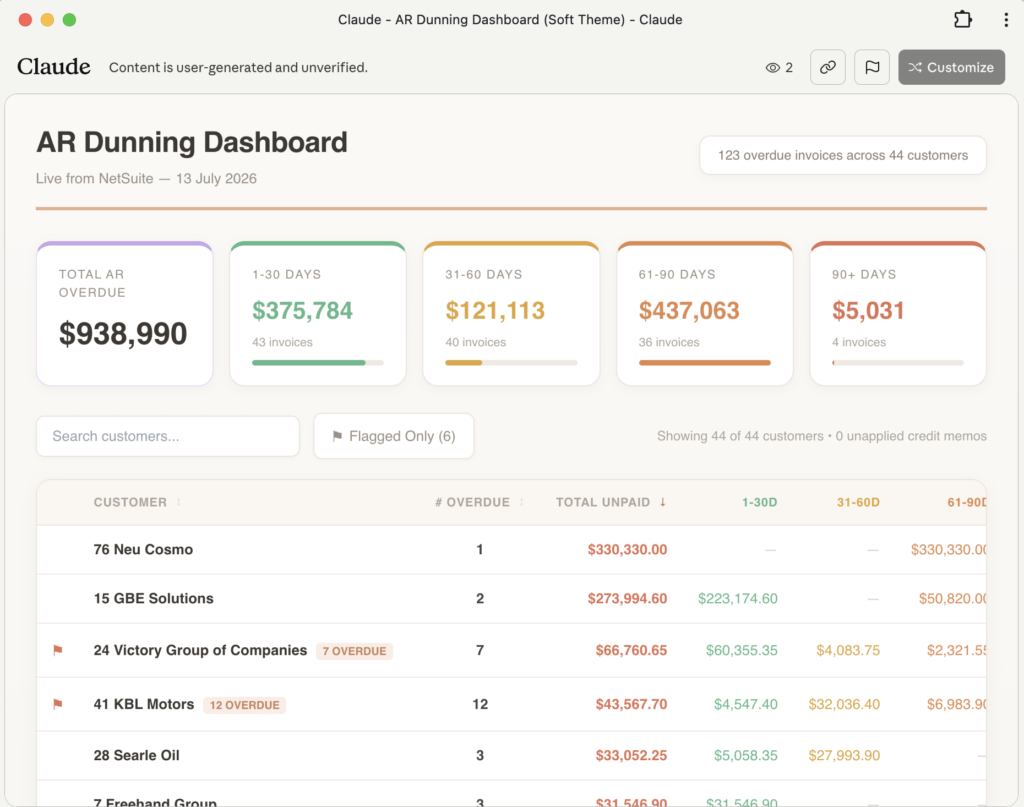
Another customer built shareable dashboards for people who don’t have NetSuite or Claude access. A team member asks the AI to pull the latest purchase order data and publish it as an HTML dashboard, which colleagues open from a link in their browser. The warehouse and operations teams can now see incoming orders and late POs at a glance without a single extra licence. Because it’s a published artifact rather than a live connection, viewers never touch the underlying systems, and access is limited to people with the link inside the organisation’s account.
We’ve also seen bulk administration handled in one motion. When a sales rep left one business, the connector reassigned every affected customer record to the incoming rep, emailed that rep a complete list of their new accounts and sent each customer a note introducing their new account manager. Three tasks that would normally involve days of record-by-record updates and a mail merge happened in a single instruction.
The connector works with ChatGPT as well as Claude, and one customer has built a two-step working pattern around it. They first ask the AI to assess their business requirements against leading practice, then, based on that output, instruct it to act: creating records, raising purchase orders or running bulk updates. So the AI ends up doing both the thinking and the legwork.
It’s not just finance teams, either. At one retailer, managers, supervisors and admin staff all run their own reports through the connector, each formatting and scheduling their reports to suit their own workflow, with their ecommerce platform connected to the same AI so questions can span both systems.
Does this reduce the need for a partner like Annexa?
It changes what customers need from us. Businesses with the connector can do far more of their own initial analysis and requirements gathering, which means they arrive at conversations with us already understanding their data and their gaps. The AI can create and edit records but it can’t delete them or configure NetSuite. Implementation, configuration and validation still need expert hands. Every change it makes is visible in the NetSuite audit trail, so there’s full accountability for anything it touches.
What’s your advice for a curious business hasn’t started?
I describe the connector as a stepping stone. Most businesses don’t yet know what they want AI to do for them, and the connector is the easiest way to find out. Get it connected, let it understand your data and practise good prompting. I usually set customers up with a handful of strong prompts, one impressive visual dashboard and one analytical financial report, and let them explore from there. Within weeks they’re coming back to show me what they’ve built. Once your team sees what’s possible, you can develop a proper AI roadmap with governance and policies behind it, and progress to more advanced agentic tooling from there.
One practical tip: connect it to your production account rather than a sandbox. Sandbox data is usually stale, the connector can’t delete records or change your configuration, and the whole point is to explore your real data.
Get a personalised NetSuite pricing estimate
Receive a tailored NetSuite quote based on your business requirements, users, modules and implementation needs.
Resources to get you started
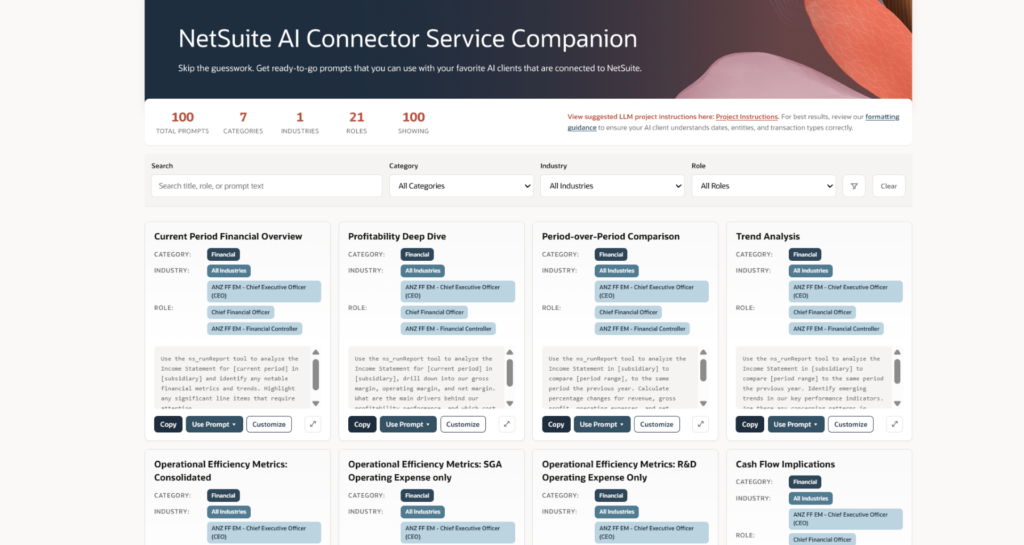
The NetSuite AI Companion SuiteApp. This free SuiteApp installs alongside the MCP connector and gives you a library of hundreds of ready-made prompts organised by business area, from finance to procurement to sales. Choose the role you’re working in, pick a prompt and send it straight to Claude or ChatGPT with a single click. The library grows constantly, and it removes the hardest part of getting started, which is knowing what to ask.
A data readiness review
Before you connect AI to your NetSuite account, review your saved search permissions and role access. If you’d like help auditing your data hygiene and governance, our team can guide you through it and help you build an adoption pathway that suits your business.
Frequently asked questions
Do we need to clean up our NetSuite data before connecting AI?
Our delivery team recommends two preparation steps: cleanse your data so it sits in the right places and lock your permissions down so reports are only visible to the people who should see them. Saved search access is the most common gap, since searches accumulate over years with no ownership or access control.
Does connecting AI to NetSuite create a security risk?
The connector operates under NetSuite’s role-based permissions, so the AI can only reach what the connecting user’s role already allows. What it does do is surface existing permission gaps quickly, because it will assemble data from every open saved search a role can see, which is why reviewing role access before connecting is the step that matters.
Should we connect a sandbox or our production account?
Our delivery team recommends production. Sandbox data is usually stale, the connector cannot delete records or change configuration, and the value of the exercise is exploring your real data.
Can the AI delete records or change our NetSuite configuration?
No. The AI can create and edit records where the connecting user’s role permits, and it cannot delete records or configure NetSuite. Every change it makes is visible in the NetSuite audit trail.
Do people viewing shared dashboards need NetSuite licences?
No. A published HTML dashboard is an artifact rather than a live connection, so viewers open it from a link in their browser without touching NetSuite or holding a licence. Access is limited to people with the link inside the organisation’s account.
How quickly do businesses see value from the connector?
Our delivery team typically sets customers up with a handful of strong prompts, one visual dashboard and one analytical financial report, and finds teams returning within weeks to show what they have built. The pattern across customers is that one use case leads to the next.
Ready to see what the MCP connector could do with your NetSuite data? Get in touch with the Annexa team to talk through your first steps.